Generate
Create images with AI
Operation Thunderstorm Cyberpunk Police Command Interface
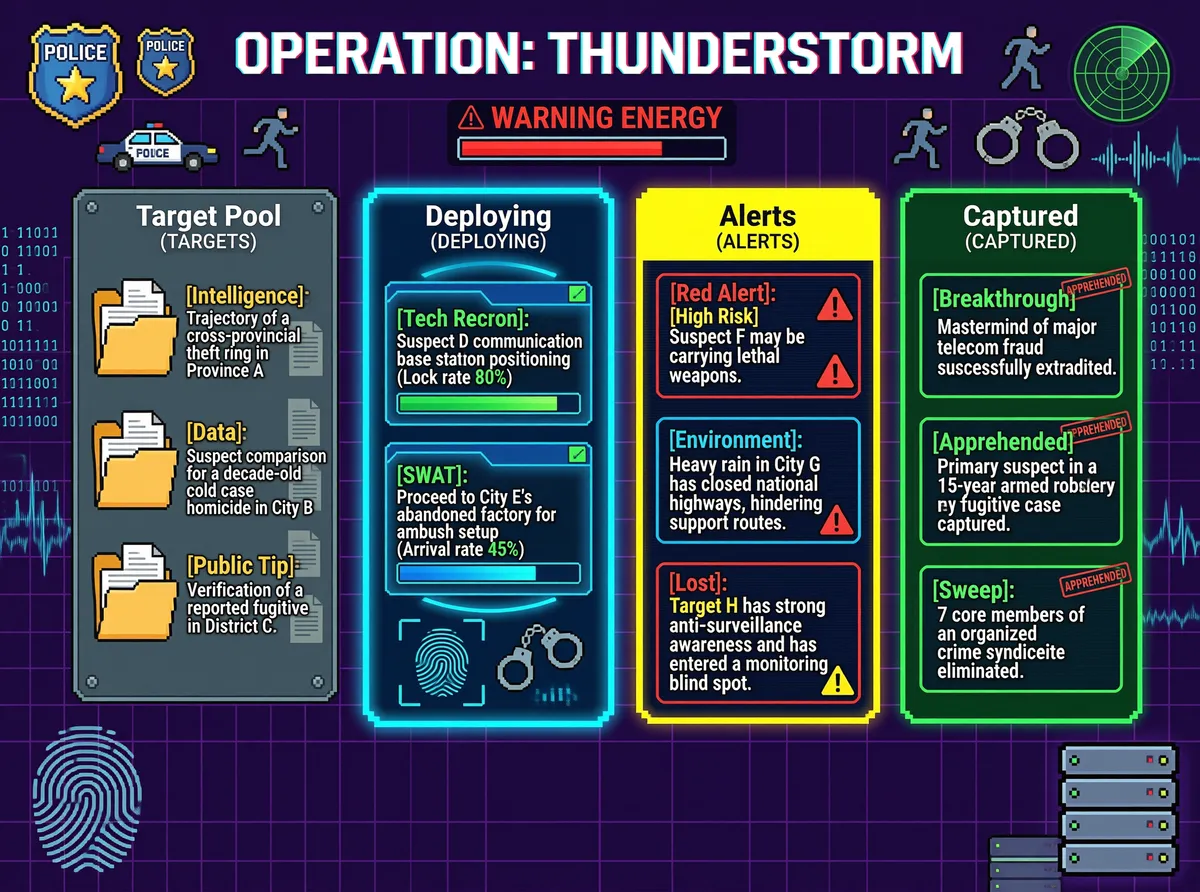
This infographic, titled "OPERATION: THUNDERSTORM," presents a highly technologized police operational command system interface. The overall design uses a deep purple grid background, paired with high-contrast neon blue, yellow, and green accents, creating a strong cyberpunk visual style. At the top center is the bold white title "OPERATION: THUNDERSTORM" with a subtle red-blue chromatic aberration effect. Below it is a red warning bar reading "WARNING ENERGY," with a triangular warning symbol on the left and a partially filled energy progress bar on the right. Distributed across the upper left and right of the interface are several pixelated police icons: on the left are blue and gold "POLICE" badges, a police car, and a running human silhouette; on the right are another running silhouette, a pair of handcuffs, and a radar scanning frame, reinforcing the themes of law enforcement and pursuit. The main content area is horizontally divided into four vertical modules, from left to right: 1. **Target Pool (TARGETS)** The module has a dark gray metallic panel background, with the title "Target Pool" followed by "(TARGETS)" in smaller text. Inside are three folder icons, each representing a piece of pending intelligence: - [Intelligence] Trajectory of a cross-provincial theft ring in Province A - [Data] Suspect comparison for a decade-old cold case homicide in City B - [Public Tip] Verification of a reported fugitive in District C Each folder is accompanied by a paper document icon on the right, symbolizing case files. 2. **Deploying (DEPLOYING)** This module features a glowing cyan-blue border with a dynamic halo effect, titled "Deploying" followed by "(DEPLOYING)" in smaller text. Inside are two task cards: - [Tech Recon] Suspect D communication base station positioning (Lock rate 80%), with a green progress bar filled to approximately 80%. - [SWAT] Proceed to City E's abandoned factory for ambush setup (Arrival rate 45%), with a blue progress bar filled to approximately 45%. At the bottom of the module are decorative elements including a fingerprint scan box and a handcuff icon, enhancing the technological feel. 3. **Alerts (ALERTS)** This module has a yellow border, titled "Alerts" followed by "(ALERTS)" in smaller text. Inside are three alert cards: - Red-bordered [Red Alert]: [High Risk] Suspect F may be carrying lethal weapons, accompanied by two red triangular warning symbols. - Blue-bordered [Environment]: Heavy rain in City G has closed national highways, hindering support routes. - Red-bordered [Lost]: Target H has strong anti-surveillance awareness and has entered a monitoring blind spot, with a yellow exclamation mark and location icon on the right. 4. **Captured (CAPTURED)** This module has a green border, titled "Captured" followed by "(CAPTURED)" in smaller text. Inside are three success case cards, each stamped with a red "APPREHENDED" seal: - [Breakthrough] Mastermind of major telecom fraud successfully extradited - [Apprehended] Primary suspect in a 15-year armed robbery fugitive case captured - [Sweep] 7 core members of an organized crime syndicate eliminated On both the left and right edges of the interface are vertical streams of binary code (e.g., "1 0 1 1 0 0 0 1...") and data waveform lines, further reinforcing the digital surveillance and real-time data stream atmosphere. In the lower left corner is a large fingerprint pattern, while the lower right features stacked hard drive or server icons, echoing themes of data security and storage. The overall layout is clearly structured, using color coding to distinguish different statuses (e.g., red = high risk, green = success, blue = in progress), and incorporates folders, progress bars, icons, and other elements to achieve multi-dimensional information visualization. It comprehensively presents the processes of intelligence collection, tactical execution, risk warning, and outcome reporting in modern police operations.
Tags
More Images